Partner & Beta Resource Center
From sign-up to your first package, and your first commission
Step-by-step guides with screenshots, training videos, a profitability calculator, the documents you need, beta testing tools and clear compliance guidance, all in one place.
Getting started: registration and two-step verification
Seven steps, with the real screens. Most people are building their first package within fifteen minutes.
Choose a plan, or use your beta pass
On the SUBNEXUS home page, pick the plan that fits. Every new account starts with a 7-day trial for $1, whatever plan you pick. Independent beta testing teams receive a beta pass code instead: it waives the $1 and sets the team's own trial length.
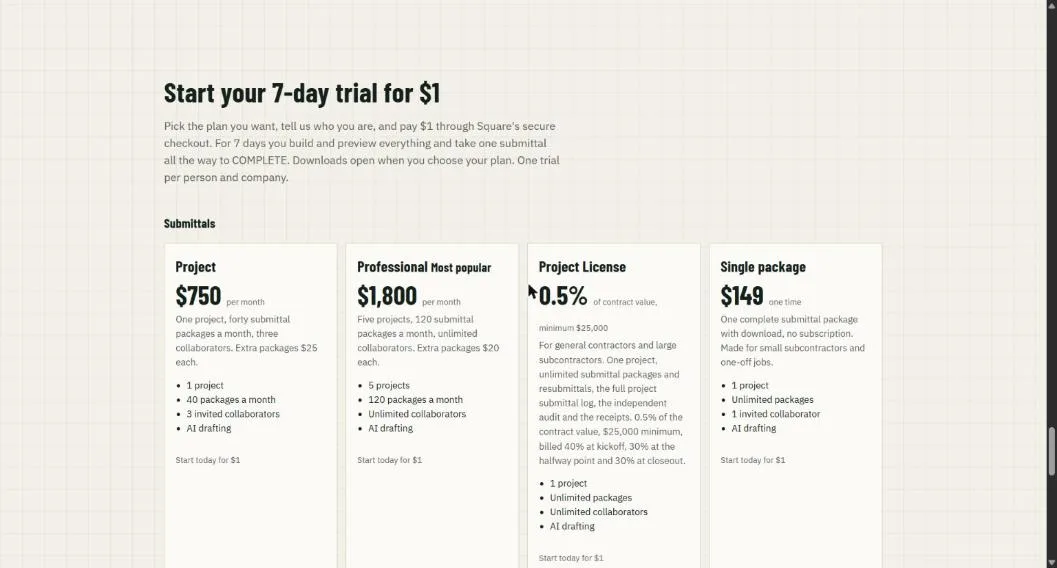
Register with your work email
Enter your name, company and email. With a beta pass, enter the code in the Beta pass code box (or open the link your team lead sent; it fills the code in).
- Without a pass, Square's secure checkout opens for the $1.
- With a pass, your workspace is ready at once.
- Use the address you will sign in with: it is your login.
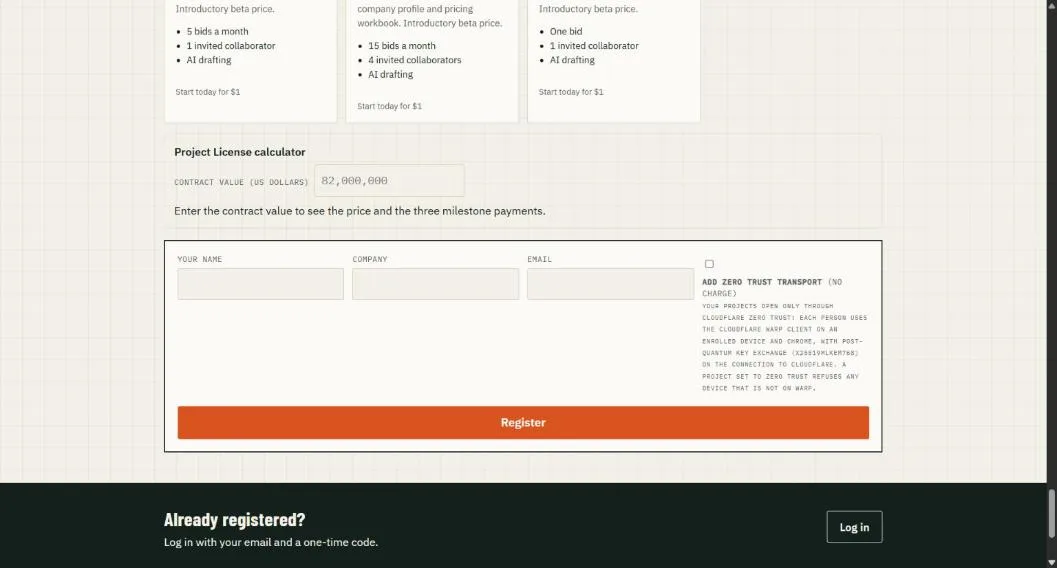
Log in: ask for a one-time code
Go to subnexus.axiom-x.us/app or press Log in. Enter the same email address and press Send login code. There is no password to remember.
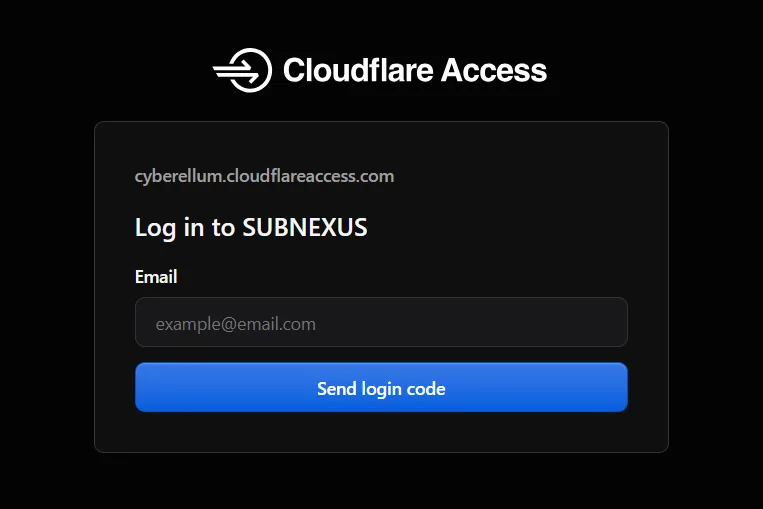
Enter the six-digit code
The code arrives by email within a minute and works for 10 minutes.
- Not there? Check spam and promotions, then press Resend.
- Expired? Start again from step 3; a new code replaces the old one.
- Typed a different address than you registered? Only the registered address receives a code.
Two-step verification (first sign-in)
The first time you sign in, SUBNEXUS asks for a second factor that protects your projects. Choose one:
- Authenticator app (Google Authenticator, Microsoft Authenticator, Authy): scan the QR code and type the six-digit number it shows.
- Security key (YubiKey and similar) or your device's fingerprint or face sign-in.
After that, the second step is asked at most once every 24 hours on each device. New phone? Add it any time at cyberellum.cloudflareaccess.com/AddMfaDevice.
Stuck at this step? Send a sign-in report with the feedback form. We fix it and extend your trial for the days you lost.
Your trial starts now, at your first sign-in
The trial clock starts when you first get into your workspace, not when you register or pay. Take the short training (six questions and one hands-on exercise): it unlocks editing and earns a signed certificate.
Build your first submittal package
Upload the specification and your product data. SUBNEXUS reads every requirement, drafts each status with the quote that proves it, checks every citation twice and assembles the package. Watch Your first submittal package: the 8 steps first.
For partners
Apply, get your link, run your book of business from the Partner Workspace.
Get your link
When you are approved, your referral link and code are emailed to you.
Open your workspace
Sign in to the Partner Workspace with an emailed code: CRM, customers, commissions, payouts, expenses and reports.
Share and get paid
Share your link with the disclosure "I'm a paid SUBNEXUS partner". You are paid on every plan payment, for the life of the customer. Recruit other partners with your partner-recruiting link and follow your whole network in the workspace.
Training videos
Short videos to share with your team and your prospects.
The SUBNEXUS Partner Program
How partners earn, what Cyberellum handles, and how referrals are credited.
A message to partners
Lifetime commissions, larger clients, white-label and custom work.
Your first submittal package: the 8 steps
From specification to a finished, checked package.
Fixing what's blocking and returned submittals
Every open item, why it matters and the one-button fix.
SUBNEXUS Bids: read a solicitation
A SAM.gov or private RFP turned into key facts and a compliance matrix.
Why SUBNEXUS
The short version to share with a prospect.
Partner profitability calculator
Recurring commissions, new-customer bonuses and your operating expenses, over three years.
An illustration from the numbers you enter and the program's published rates. Project Licenses are priced per contract (0.5% of contract value, $25,000 minimum) and earn the same percentage on each milestone payment.
Downloads
Agreements, training material and marketing resources.
Beta testing
Sandbox access for testing teams, a standard feedback form with screenshots, and a reference number on every report so you can follow it to resolution.
Sandbox access for testing teams
Independent beta testing teams receive a complimentary beta pass from Cyberellum: one code for the team, a set number of seats and days, and downloads open so finished packages can be evaluated. The days count from each tester's first sign-in.
Have a code? Check it here, then register with it on the home page.
Leading a testing team? Ask for a pass with the form (topic: Beta testing), naming the team and how many testers.
Track your feedback
Every report gets a reference number like FB-261127-AB12C, emailed to you. Look up where it stands: received, in review, in progress, resolved.
Beta feedback form
One report per issue or idea. Screenshots help us fix things fastest.
Federal contracting, referral eligibility and conflicts of interest
Many SUBNEXUS customers bid federal work. These are the rules every partner follows so referrals stay clean.
How commissions work with federal contractors
- Commissions are paid by Cyberellum from what Cyberellum receives for SUBNEXUS. They are never added to a customer's price and never charged to any government contract, subcontract or bid.
- Referring a contractor to SUBNEXUS is a software referral. It never involves helping anyone win, or influencing, a government contract.
- No payment, gift or favor may be offered, given or accepted to obtain or reward favorable treatment on a government prime contract or subcontract (Anti-Kickback Act, 41 U.S.C. §§ 8701-8707; FAR 3.502 and clause 52.203-7).
- Nothing of value may go to a government employee in connection with a contract (FAR 3.202, clause 52.203-3, Gratuities).
- When the customer itself is a federal, state or local government agency, a commission is paid only under a separate written agreement that Cyberellum approves first, consistent with the Covenant Against Contingent Fees (FAR 3.4, clause 52.203-5).
Who can earn a commission on a referral
- Eligible: independent advisors, consultants, suppliers, educators, associations and anyone 18 or older with contractor relationships, who is not on a US sanctions or exclusion list (SAM.gov exclusions, OFAC).
- Not on that company: you earn nothing on a company you work for or act for (officer, employee, partner or agent), and you never share a commission with anyone at the referred company.
- Not eligible: your own company, companies already registered with SUBNEXUS, and accounts Cyberellum already serves directly.
- Government employees: current federal, state and local employees may not earn commissions on referrals connected to their official duties or agency, and need their ethics office's approval for any outside activity (5 C.F.R. part 2635; 18 U.S.C. § 208). Former officials follow the post-government limits in 18 U.S.C. § 207 and 41 U.S.C. § 2104.
- Advisors to an agency: if you advise an agency on an acquisition, do not refer companies competing in it while you do (organizational conflict of interest, FAR 9.5).
This guide summarizes the rules partners follow under the Program Agreement. For questions about your own situation, talk with your own counsel.
Trial terms
- Every new account starts with a 7-day trial for $1, whatever plan is chosen; a beta pass sets its own length and waives the $1.
- The trial starts at your first successful sign-in, when your workspace is activated.
- When sign-in or two-step verification problems prevent access, Cyberellum extends the trial for the days lost; you are emailed the new end date.
- During the trial you build and preview everything and take one submittal all the way to COMPLETE. Downloads open with a plan (beta passes include downloads for evaluation).
- One $1 trial per person and company. When it ends your work is kept; choose a plan to keep working. Full terms: plan and trial terms.
Questions
When does my trial start?
At your first successful sign-in to your workspace, not when you register or pay. If sign-in or two-step verification problems keep you out, send a sign-in report and we extend your trial for the days you lost.
I never received my login code.
Check spam and promotions, make sure you typed the address you registered with, then press Resend. Codes work for 10 minutes. Still nothing? Send a report with the form (area: Sign-in) and we sort it out.
I changed phones and lost my authenticator.
Send a report with the form (area: Sign-in). We reset your second factor so you can enroll the new phone, and extend your trial if you lost days.
Can my testing team share one account?
Each tester registers with their own email using the team's beta pass code. Each seat is one person, so every report and action is recorded under the right name.
How are partners paid?
Monthly, 30 days after the month closes, once the balance reaches the payout minimum, by ACH bank transfer through Square or by check. A W-9 is needed before the first payout.
Where do I see my referrals and commissions?
In the Partner Workspace: dashboard, customers, the commissions ledger, payouts, your own expenses and prospects, and year-end reports with CSV export.